All series

  • Reliable and essential
  • Turntable image 1Turntable image 2Turntable image 3Turntable image 4Turntable image 5Turntable image 6Turntable image 7Turntable image 8Turntable image 9Turntable image 10Turntable image 11Turntable image 12Turntable image 13Turntable image 14Turntable image 15Turntable image 16Turntable image 17Turntable image 18Turntable image 19Turntable image 20Turntable image 21Turntable image 22Turntable image 23Turntable image 24Turntable image 25Turntable image 26Turntable image 27Turntable image 28Turntable image 29Turntable image 30Turntable image 31Turntable image 32Turntable image 33Turntable image 34Turntable image 35Turntable image 36Turntable image 37Turntable image 38Turntable image 39Turntable image 40Turntable image 41Turntable image 42Turntable image 43Turntable image 44Turntable image 45Turntable image 46Turntable image 47Turntable image 48Turntable image 49Turntable image 50Turntable image 51Turntable image 52Turntable image 53Turntable image 54Turntable image 55Turntable image 56Turntable image 57Turntable image 58Turntable image 59Turntable image 60Turntable image 61Turntable image 62Turntable image 63Turntable image 64Turntable image 65Turntable image 66Turntable image 67Turntable image 68Turntable image 69Turntable image 70Turntable image 71Turntable image 72
  • Reliable and essential
  • Reliable and essential
  • Reliable and essential
  • Reliable and essential
  • Reliable and essential
  • Turntable image 1Turntable image 2Turntable image 3Turntable image 4Turntable image 5Turntable image 6Turntable image 7Turntable image 8Turntable image 9Turntable image 10Turntable image 11Turntable image 12Turntable image 13Turntable image 14Turntable image 15Turntable image 16Turntable image 17Turntable image 18Turntable image 19Turntable image 20Turntable image 21Turntable image 22Turntable image 23Turntable image 24Turntable image 25Turntable image 26Turntable image 27Turntable image 28Turntable image 29Turntable image 30Turntable image 31Turntable image 32Turntable image 33Turntable image 34Turntable image 35Turntable image 36Turntable image 37Turntable image 38Turntable image 39Turntable image 40Turntable image 41Turntable image 42Turntable image 43Turntable image 44Turntable image 45Turntable image 46Turntable image 47Turntable image 48Turntable image 49Turntable image 50Turntable image 51Turntable image 52Turntable image 53Turntable image 54Turntable image 55Turntable image 56Turntable image 57Turntable image 58Turntable image 59Turntable image 60Turntable image 61Turntable image 62Turntable image 63Turntable image 64Turntable image 65Turntable image 66Turntable image 67Turntable image 68Turntable image 69Turntable image 70Turntable image 71Turntable image 72
  • Reliable and essential
  • Reliable and essential
  • Reliable and essential
  • Reliable and essential

LCD monitor

201S8LHSB2/69

Reliable and essential
Our S Line monitor delivers business efficiency. Features like Flicker-free and LowBlue mode make work easy-on-the eyes and increases your productivity.
See all benefits

for business efficiency

Reliable and essential

  • S Line

  • 20 (19.5" / 49.5 cm diag.)

  • 1600 x 900 (HD+)

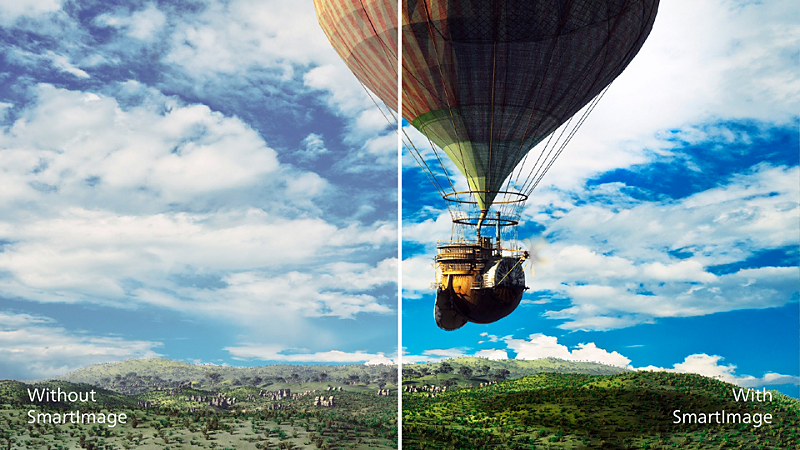
SmartImage presets for easy optimized image settings

SmartImage presets for easy optimized image settings

SmartImage is an exclusive leading edge Philips technology that analyzes the content displayed on your screen and gives you optimized display performance. This user friendly interface allows you to select various modes like Office, Photo, Movie, Game, Economy etc., to fit the application in use. Based on the selection, SmartImage dynamically optimizes the contrast, color saturation and sharpness of images and videos for ultimate display performance. The Economy mode option offers you major power savings. All in real time with the press of a single button!

LowBlue Mode for easy on-the-eyes productivity

LowBlue Mode for easy on-the-eyes productivity

Studies have shown that just as ultra-violet rays can cause eye damage, shortwave length blue light rays from LED displays can cause eye damage and affect vision over time. Developed for wellbeing, Philips LowBlue Mode setting uses a smart software technology to reduce harmful shortwave blue light.

Less eye fatigue with Flicker-free technology

Less eye fatigue with Flicker-free technology

Due to the way brightness is controlled on LED-backlit screens, some users experience flicker on their screen which causes eye fatigue. Philips Flicker-free Technology applies a new solution to regulate brightness and reduce flicker for more comfortable viewing.

Technical Specifications

Reviews

Sign up to the Philips newsletter for exclusive offers

  • Member-exclusive offers.
  • Early access to sales.
  • News on product launches and tips for healthy lifestyles.

I would like to receive promotional communications – based on my preferences and behaviour – about Philips products, services, events and promotions. I can easily unsubscribe at any time!

  • Member-exclusive offers.
  • Early access to sales.
  • News on product launches and tips for healthy lifestyles.
Disclaimers
  1. NTSC Area based on CIE1976

  2. sRGB Area based on CIE1931

  3. The monitor may look different from feature images.