2 year warranty



Simplify your connections with USB-C
E Line
34" (86.36 cm)
3440 x 1440 (WQHD)

Connect your notebook with one USB-C cable
This Philips display features a USB type-C connector with power delivery. With intelligent and flexible power management, you can power charge your compatible device directly. Its slim, reversible USB-C allows for easy, one-cable connection. You can watch high resolution video and transfer data at a super-speed, while powering up and re-charging your compatible device at the same time.
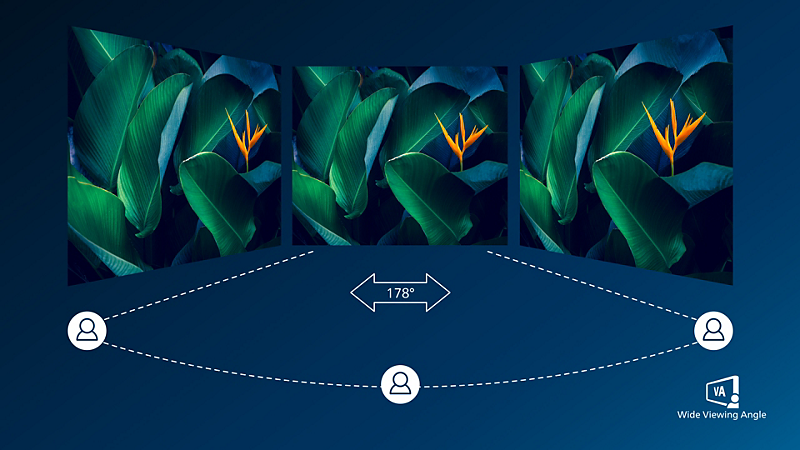
VA display delivers awesome images with wide viewing angles
Philips VA LED display uses an advanced multi-domain vertical alignment technology which gives you super-high static contrast ratios for extra vivid and bright images. While standard office applications are handled with ease, it is especially suitable for photos, web-browsing, movies, gaming, and demanding graphical applications. It's optimized pixel management technology gives you 178/178 degree extra wide viewing angle, resulting in crisp images.

CrystalClear images with UltraWide QHD 3440 x 1440 pixels
These Philips screens deliver CrystalClear, UltraWide Quad HD 3440 x 1440 pixel images. Utilizing high performance panels with high-density pixel count, 178/178 wide viewing angles, these new displays will make your images and graphics come alive. The UltraWide 21:9 format enables more productivity with more room for side-by-side comparisons and more viewable spreadsheet columns. Whether you are demanding professional requiring extremely detailed information for CAD-CAM solutions, or a financial wizard working on huge spreadsheets, Philips displays delivers CrystalClear images.
Technical Specifications
Reviews
4.0
of 5
2
Reviews
Bumtv
14/01/2026

United Kingdom
Verified buyer
Nice quality immage
Its a good quality monitor, 34 inch is better than 32 inch to watch movies
Yes, I recommend this product
This review was made for 346E2CUAE UltraWide LCD monitor
Yes, I recommend this product
This review was made for 346E2CUAE UltraWide LCD monitor
Mr C
02/10/2021
United Kingdom
Verified buyer
Ok but needs usbc hub pass through capabilities
The monitor is fine but the need to have to use two usb cables to dock a laptop and pass through the monitor usb hub is a little frustrating . Not sure why Philips would add support for usbC DisplayPort mode but not include the full duck capabilities .
Pros
Good quality monitor at a reasonable price
Cons
Lack of full usbC docking capability
This review was made for 346E2CUAE UltraWide LCD monitor
This review was made for 346E2CUAE UltraWide LCD monitor
Sign up to the Philips newsletter for exclusive offers
- Member-exclusive offers.
- Early access to sales.
- News on product launches and tips for healthy lifestyles.
- Member-exclusive offers.
- Early access to sales.
- News on product launches and tips for healthy lifestyles.
The maximum resolution works for either HDMI input or DP input.
For best output performance, please always ensure that your graphic card is capable of achieving the maximum resolution and refresh rate of this Philips display.
Response time value equal to SmartResponse
MPRT is to adjust brightness for blur reduction, so cannot adjust brightness while MPRT is turned on. To reduce motion blur, LED backlight will strobe synchronously with screen refresh, which may cause noticeable brightness change.
MPRT is gaming-optimized mode. Turn on MPRT may cause noticeable screen flickering. It is recommended to turn off when you are not using the gaming function.
NTSC Area based on CIE1976
sRGB Area based on CIE1931
2020 Advanced Micro Devices, Inc. All rights reserved. AMD, the AMD Arrow logo, AMD FreeSync™ and combinations thereof are trademarks of Advanced Micro Devices, Inc. Other product names used in this publication are for identification purposes only and may be trademarks of their respective companies.
For USB-C power and charging function, your Notebook/device must support USB-C standard Power Delivery specifications. Please check with your Notebook user manual or manufacturer for more details.
For Video transmission via USB-C, your Notebook/device must support USB-C DP Alt mode
The monitor may look different from feature images.
EPEAT rating is valid only where Philips registers the product. Please visit https://www.epeat.net/ for registration status in your country.
The products and accessories listed on this leaflet may differ by country and region.