All series

  • Redefining workflow productivity
  • Turntable image 1Turntable image 2Turntable image 3Turntable image 4Turntable image 5Turntable image 6Turntable image 7Turntable image 8Turntable image 9Turntable image 10Turntable image 11Turntable image 12Turntable image 13Turntable image 14Turntable image 15Turntable image 16Turntable image 17Turntable image 18Turntable image 19Turntable image 20Turntable image 21Turntable image 22Turntable image 23Turntable image 24Turntable image 25Turntable image 26Turntable image 27Turntable image 28Turntable image 29Turntable image 30Turntable image 31Turntable image 32Turntable image 33Turntable image 34Turntable image 35Turntable image 36Turntable image 37Turntable image 38Turntable image 39Turntable image 40Turntable image 41Turntable image 42Turntable image 43Turntable image 44Turntable image 45Turntable image 46Turntable image 47Turntable image 48Turntable image 49Turntable image 50Turntable image 51Turntable image 52Turntable image 53Turntable image 54Turntable image 55Turntable image 56Turntable image 57Turntable image 58Turntable image 59Turntable image 60Turntable image 61Turntable image 62Turntable image 63Turntable image 64Turntable image 65Turntable image 66Turntable image 67Turntable image 68Turntable image 69Turntable image 70Turntable image 71Turntable image 72
  • Redefining workflow productivity
  • Redefining workflow productivity
  • Redefining workflow productivity
  • Redefining workflow productivity
  • Redefining workflow productivity
  • Redefining workflow productivity
  • Redefining workflow productivity
  • Redefining workflow productivity
  • Turntable image 1Turntable image 2Turntable image 3Turntable image 4Turntable image 5Turntable image 6Turntable image 7Turntable image 8Turntable image 9Turntable image 10Turntable image 11Turntable image 12Turntable image 13Turntable image 14Turntable image 15Turntable image 16Turntable image 17Turntable image 18Turntable image 19Turntable image 20Turntable image 21Turntable image 22Turntable image 23Turntable image 24Turntable image 25Turntable image 26Turntable image 27Turntable image 28Turntable image 29Turntable image 30Turntable image 31Turntable image 32Turntable image 33Turntable image 34Turntable image 35Turntable image 36Turntable image 37Turntable image 38Turntable image 39Turntable image 40Turntable image 41Turntable image 42Turntable image 43Turntable image 44Turntable image 45Turntable image 46Turntable image 47Turntable image 48Turntable image 49Turntable image 50Turntable image 51Turntable image 52Turntable image 53Turntable image 54Turntable image 55Turntable image 56Turntable image 57Turntable image 58Turntable image 59Turntable image 60Turntable image 61Turntable image 62Turntable image 63Turntable image 64Turntable image 65Turntable image 66Turntable image 67Turntable image 68Turntable image 69Turntable image 70Turntable image 71Turntable image 72
  • Redefining workflow productivity
  • Redefining workflow productivity
  • Redefining workflow productivity
  • Redefining workflow productivity
  • Redefining workflow productivity
  • Redefining workflow productivity
  • Redefining workflow productivity

Curved Business Monitor32:9 SuperWide curved monitor with USB-C

49B2U5900CH/73

Redefining workflow productivity
Welcome to a more efficient workspace. To facilitate everyday workflow, this monitor's large 32:9 SuperWide screen is equipped with a new FocusSync Light and tilting webcam feature that helps you flow between tasks with ease.
See all benefits

Redefining workflow productivity

  • 5000 series

  • 49 (48.8" / 124 cm diag.)

  • 5120 x 1440 (Dual QHD)

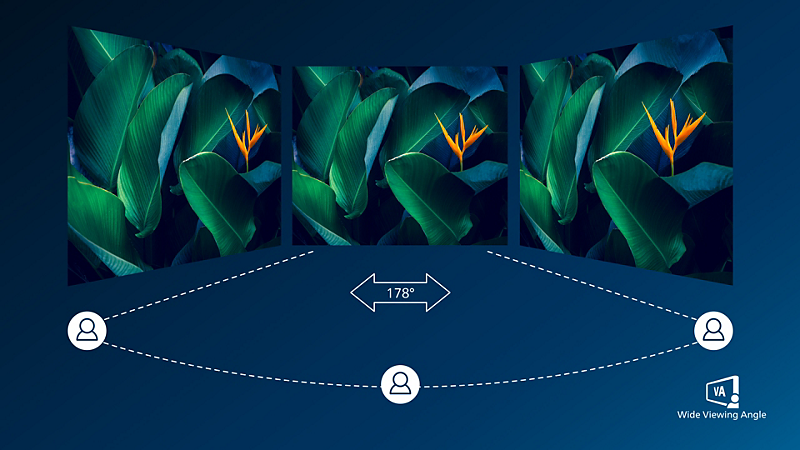
VA display delivers awesome images with wide viewing angles

VA display delivers awesome images with wide viewing angles

Philips VA LED display uses an advanced multi-domain vertical alignment technology which gives you super-high static contrast ratios for extra vivid and bright images. While standard office applications are handled with ease, it is especially suitable for photos, web-browsing, movies, gaming, and demanding graphical applications. It's optimized pixel management technology gives you 178/178 degree extra wide viewing angle, resulting in crisp images.

DisplayHDR 400 for more lifelike and outstanding visuals

DisplayHDR 400 for more lifelike and outstanding visuals

VESA-certified DisplayHDR 400 delivers a significant step-up from normal SDR displays. Unlike, other 'HDR compatible' screens, true DisplayHDR 400 produces astonishing brightness, contrast and colors. With global dimming and minimum 400 nits brightness, images come to life with notable highlights while featuring deeper, more nuanced blacks. It renders a fuller palette of rich new colors, delivering a visual experience that engages your senses.

RJ-45 to USB-C gives easy network connection with security

RJ-45 to USB-C gives easy network connection with security

Simplify all peripherals from monitor to PC using one-cable-docking USB Type-C connector, includes networking, high resolution video output from PC to monitor, and surfing on Internet without an additional network cable, even without LAN port on your notebook. RJ45 connection through USB-C offers a fast and secure connection when needed. Getting the fastest data speeds allows you to transfer data from a HDD to your PC faster than ever. Additionally, USB-C with power delivery can even enable you to power and charge your notebook from the monitor, eliminating the need for extra power cables.

Technical Specifications

Awards

  • Award image PBTAWARD73
  • Award image PBTAWARD72

Reviews

These reviews are managed by Bazaarvoice and comply with the Bazaarvoice Authenticity Policy, which is supported by anti-fraud technology and human analysis. Details may be found at
Customer opinions in the form of product and star ratings are useful for all customers. They allow you to learn more about the product and help you make a purchase decision. Any customer who has purchased a product online or in store can submit a review

4.0

of 5


1

Review


5
3
2
1

27/06/2024

United Kingdom

United Kingdom

Verified buyer

I really like this product but.....

This is a great monitor. Loads of real estate to have multiple windows running and with windows 11 the auto arrange feature works brilliantly! The screen is bright and clear and the camera / mic that are inbuilt work well. The 'instructions' that come with it are awful though. Not sure how you descibe a complex monitor with a few pictures! I still don't get the KVM feature from the line diagram!

Pros

Nice moinitor. Huge area and good camera and Mic.

Cons

Poor instructions and explanation of features holds you back

This review was made for Curved Business Monitor 49B2U5900CH 32:9 SuperWide curved monitor with USB-C

This review was made for Curved Business Monitor 49B2U5900CH 32:9 SuperWide curved monitor with USB-C

Sign up to the Philips newsletter for exclusive offers

  • Member-exclusive offers.
  • Early access to sales.
  • News on product launches and tips for healthy lifestyles.

I would like to receive promotional communications – based on my preferences and behaviour – about Philips products, services, events and promotions. I can easily unsubscribe at any time!

  • Member-exclusive offers.
  • Early access to sales.
  • News on product launches and tips for healthy lifestyles.
Disclaimers
  1. Radius of the arc of the display curvature in mm

  2. Response time value equal to SmartResponse

  3. NTSC Area based on CIE1976

  4. sRGB Area based on CIE1931

  5. Activities such as screen sharing, on-line streaming video and audio over the Internet can impact your network performance. Your hardware, network bandwidth and its performance will determine overall audio and video quality.

  6. For USB-C power and charging function, your Notebook/device must support USB-C standard Power Delivery specifications. Please check with your Notebook user manual or manufacturer for more details.

  7. If your Ethernet connection seems slow, please enter OSD menu and select USB 3.0 or higher version which can support the LAN speed to 1G.

  8. For Video transmission via USB-C, your Notebook/device must support USB-C DP Alt mode

  9. The USB-C power delivery of this display is up to 100 W (96 W in typical), the maximum power delivery will depend on your device.

  10. EPEAT rating is valid only where Philips registers the product. Please visit https://www.epeat.net/ for registration status in your country.

  11. RJ45 supports PXE (Preboot eXecution Environment), MAC Address Pass-Through (MAPT) , and Wake on LAN (WOL) on compatible systems. Support may vary depending on system configuration.

  12. When calculating energy costs saving from PowerSensor, both USB and Power delivery are excluded.

  13. The monitor may look different from feature images.